

Invoice templates with your logo and brand color
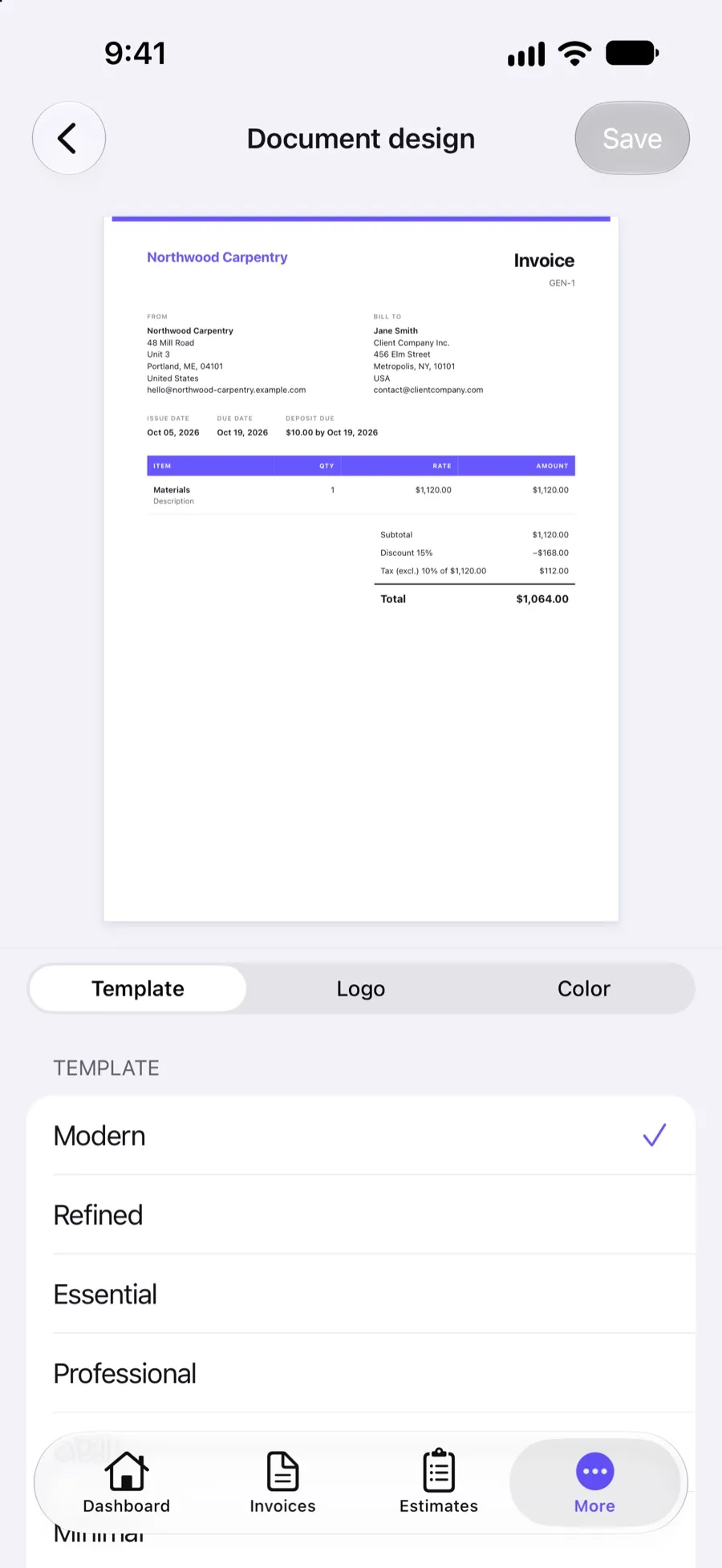
Make every invoice, estimate and purchase order look like your business. Pick one of eight templates, add your logo and brand color, and choose what the header, item table and footer show. Clients see the same design online and in the PDF.
Included in Invoxa Pro, on the web and in the iPhone app. 3-day free trial, no credit card needed.
How it works
Pick a template
Modern, Refined, Essential, Professional, Clean, Minimal, Bold or Structured, with a live preview.
Add your brand
Upload your logo, set its size and position, and choose your brand color.
Choose what shows
Turn header details, table columns, the tax summary, notes and signature on or off. Every document uses it.
What you can do
Eight templates
From the airy Minimal to the dense Structured, all made for screen and print.
Your logo
Small, medium or large, aligned left, center or right, with or without your company name.
Brand color
Choose from 85 colors for headings and accents.
Header and table
Show or hide shipping details, due date and payment terms, item codes, quantity and rate, tax and parts/labor.
Footer, notes and terms
Default notes per document type, terms and conditions, and a summary of taxes.
Signature
Add your signature image and a signature line for your client to sign a printed copy.
Why design matters on an invoice
A clean, branded invoice is easier to approve and harder to ignore. Your logo tells the client’s accounts team who the invoice is from; a clear layout gets the total, due date and payment instructions read. Invoxa keeps the design in one place, so every invoice, estimate and purchase order matches without any per-document work.
The eight templates
All templates show the same information and differ in layout and weight. Modern and Refined suit most businesses; Minimal and Clean leave lots of white space; Bold and Structured put more emphasis on the item table. The preview updates as you switch, using your real logo and color.
Header, table and footer
In the header you choose whether to show shipping details, the due date and the payment terms, and you can add your own fields, such as a license or VAT number, that appear on every document. The item table can show item codes, quantity and rate, tax and a parts/labor split with subtotals. The footer holds your default notes (one for all documents or one per type), terms and conditions, a summary of taxes and the signature block.
Labels and formats
Every label on the document can be renamed, so “Bill to” can become “Client” or “Facturar a”. Date and currency formats are set once for your business. See invoices in any language for how to issue documents in another language.
Frequently asked questions
Can I add my logo to invoices in Invoxa?
Yes. Upload your logo in the document design settings, choose small, medium or large, and align it left, center or right. It appears on every invoice, estimate and purchase order.
How many invoice templates does Invoxa have?
Eight: Modern, Refined, Essential, Professional, Clean, Minimal, Bold and Structured. You can switch at any time and existing documents follow the new design.
Can I add my signature to invoices?
Yes. Upload a signature image (PNG, JPEG or WebP) and choose to sign all documents. You can also show two signature lines at the bottom so a client can sign a printed copy.
Can clients sign estimates electronically?
No. Clients approve or reject an estimate online with one click, and can sign a printed copy on the signature line, but Invoxa does not collect electronic signatures.
Related features
Invoices in any language
Rename every label on your documents to issue invoices in Spanish, French, German or any language.
Invoice numbering
Automatic numbers with your own prefix and starting number for invoices, estimates and purchase orders.
Email invoices
Email invoices, estimates and purchase orders from Invoxa with a button to view and pay, or share the link.
 Read reviews on App Store
4.9 out of 5 on App Store
 Read reviews on Google Play
4.9 out of 5 on Google Play