

Create an invoice by voice or a sentence
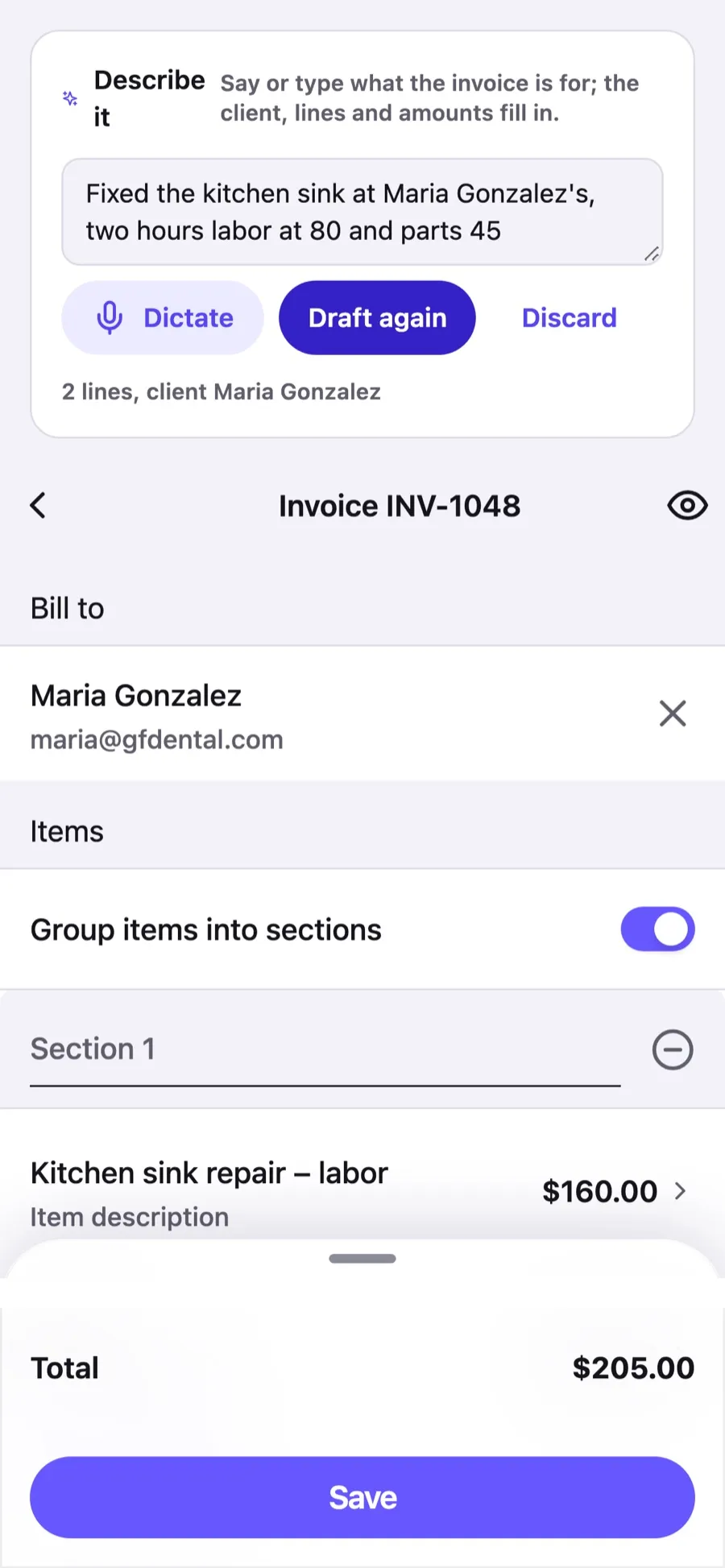
"Fixed the kitchen sink at John Smith's, two hours at 80 and parts 45, due in two weeks." Say it or type it, and Invoxa drafts the invoice: the client from your list, the lines with quantities and prices, your default tax, the discount and the due date. You check the draft in the editor and save. On the phone, your words are recognised on the device; only the text is sent.
Included in Invoxa Pro, on the web and in the iPhone and Android apps. 3-day free trial, no credit card needed.
How it works
Describe the job
Tap Describe it on a new invoice or estimate and dictate or type one or two sentences, in your language.
Check the draft
The client, lines, quantities, prices, tax and due date fill in; anything Invoxa had to guess is pointed out.
Save and send
Fix a number if needed, save, and send the invoice as usual.
What you can do
Your clients and items
A name you say is matched to your client list; an item from your catalog brings its price along.
Quantities and prices
"Two hours at 80", "parts 45", "three at 24.50": quantities, units and unit prices as said.
Tax and discount
Your default tax applies unless you say otherwise; "10% off" or "no tax" are understood.
Due date
"Net 30", "due in two weeks" or "due Friday" set the payment date.
Any language
Dictate in English, Spanish, German or the language your phone recognises; the lines keep it.
Nothing saved unseen
The draft opens in the editor; nothing is created until you save.
Why dictate an invoice
The first invoice is the hardest: a new client to type, lines to add, prices to look up. Said out loud in the van after the job, it is one sentence. Invoxa turns that sentence into a draft with your real clients and catalog prices, so the invoice is ready to check before you have parked.
What Invoxa understands
The client (an existing one by name, or a new one), each product or service with its quantity, unit and price, a tax when you name one, a discount, when payment is due, and a note for the client. Numbers can be words (“two hours”, “one fifty”), and the sentence can be in any language your phone recognises.
Good to know
The draft comes from an AI model; it is right most of the time and says where it was unsure, but it is a draft. Read the lines and the total before you save. See the privacy policy for who processes the text.
Frequently asked questions
Can I create an invoice by voice?
Yes. On a new invoice tap Describe it, dictate what the job was, and the client, lines, prices, tax and due date fill in. Check the draft and save. The same works on the web, by typing or with the browser's dictation.
Does it know my clients and prices?
Yes. A name you say is matched to your client list, and an item from your catalog brings its price when you do not say one. A new name becomes a new client when you save.
Is my voice sent anywhere?
No. The phone turns speech into text on the device; only the text goes to Invoxa's server, where an AI model turns it into the draft.
What if it gets a number wrong?
The draft points out what it had to guess, and every field is editable before you save. Nothing is created until you save.
Related features
Clients and items
Save clients with several emails, phones and addresses, and a catalog of items with prices, units and taxes.
Taxes and discounts
Sales tax, VAT or GST per line, inclusive or exclusive, line and invoice discounts, and a tax summary.
Email invoices
Email invoices, estimates and purchase orders from Invoxa with a button to view and pay, or share the link.
 Read reviews on App Store
4.9 out of 5 on App Store
 Read reviews on Google Play
4.9 out of 5 on Google Play