Mastering Business Receipt Management: Expert Strategies for Financial Control
Proper receipt management directly affects how well you understand and control your business finances. Managing business receipts shouldn’t be complex, but it does need a systematic approach.
In today’s digital age, a reliable receipt template and efficient receipt tools aren’t optional. Businesses with digital receipt systems and organized documentation spend less time on bookkeeping and are better prepared for tax time.
Why Tracking Business Receipts Is Critical to Your Success
Every transaction record, whether generated through a template or received from vendors, represents more than mere paperwork. These documents serve as vital records of your business activities, fulfilling multiple essential functions.
Building a Comprehensive Financial Record
Businesses with organized receipt systems understand their spending patterns much better. By documenting each transaction carefully, you’ll gain valuable insights into expense trends, identify cost-saving opportunities, and make data-driven decisions rather than relying on guesswork.
A retailer tracking receipts by category, for example, can spot creeping costs such as packaging far sooner. This detailed approach streamlines cash flow management while simplifying tax preparation, enabling more strategic business planning.
For establishing thorough records, you should maintain both physical and digital copies of all business receipts, particularly for significant purchases. Quality receipt generators help standardize documentation for employee or contractor reimbursements.
Preparing for Tax Season with Confidence
In the US, the IRS generally expects you to keep records supporting your return for at least three years, and longer in some cases (up to seven years, for example, for a bad debt deduction). Organizations with meticulously organized documentation face far less stress in an audit.
If the IRS questions an expense, being able to produce the receipt within hours rather than weeks makes the difference between a quick review and a costly adjustment.
Well-maintained receipts expedite tax filing processes while maximizing legitimate deductions and offering crucial protection during audits. This benefit alone justifies investing in reliable receipt management solutions.
Creating Professional Financial Statements
Investors and lenders scrutinize financial statements extensively. Receipt documentation forms the foundation for accurate income statements and balance sheets.
A bank reviewing a loan application may ask for receipts to confirm how expenses were categorized; organized records make that request easy to answer.
Maintaining organized financial records demonstrates your business’s stability and credibility—essential qualities when seeking loans or attracting potential investors. This level of organization starts with documenting every transaction properly, which makes utilizing standardized receipt generation tools absolutely crucial.
Maintaining Legal Transaction Documentation
Detailed receipt documentation can settle a dispute over an equipment purchase quickly. Proper transaction records provide essential legal proof, helping you address disagreements with vendors, customers, or tax authorities effectively.
Comprehensive receipt documentation often prevents costly legal battles. If a supplier bills you for a delivery you never received, for example, the absence of a signed delivery receipt is your strongest argument.
You should regularly reconcile receipts with returns or exchanges to maintain accurate records that showcase your operation’s transparency. This practice helps identify potential supplier errors or fraudulent activities while building trust with stakeholders.
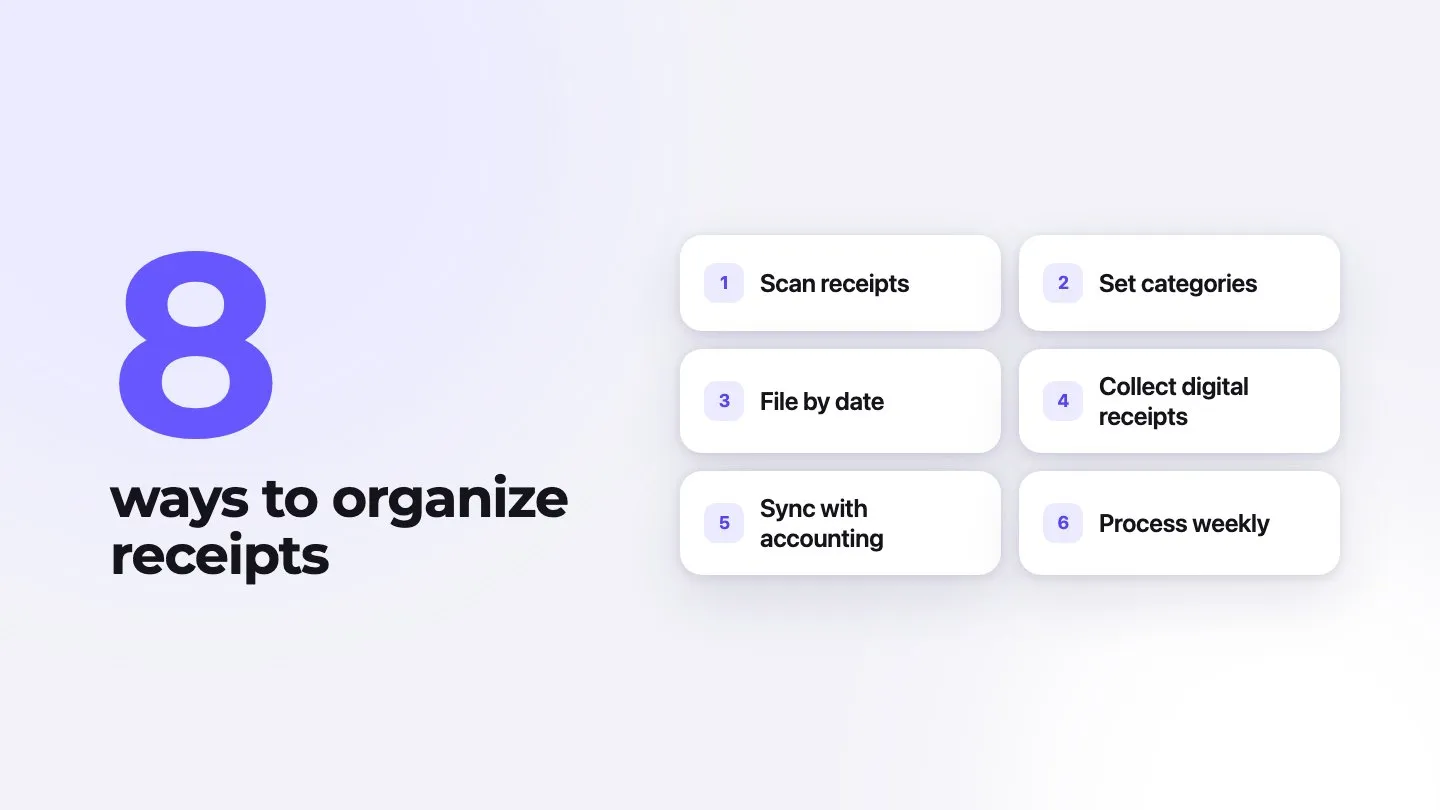
8 Expert Strategies for Organizing Business Receipts
These proven approaches keep receipts under control:
1. Implement Digital Receipt Scanning
Transform your mobile device into a powerful accounting tool using receipt management technology. Receipt scanning apps and the capture features in accounting software enable instant data capture. This approach particularly benefits businesses managing field operations or frequent travel expenses.
When technicians photograph and categorize receipts on the spot, nothing gets lost in a van and nobody has to retype them later.
Premium receipt scanning applications automatically extract relevant information into expense records. This functionality reduces paper clutter, simplifies tracking, and enables immediate receipt processing rather than allowing documentation to accumulate.
For customer-facing businesses, branded digital receipts project professionalism while maintaining efficiency. An invoicing tool such as Invoxa can help here: when a client pays an invoice, it’s marked paid or partially paid, and you can attach files such as photos of purchase receipts to the invoice for your records. Invoxa doesn’t scan or extract data from receipts, so use a dedicated app for your expense receipts.
2. Establish Strategic Receipt Categories
Develop logical categorization systems for organizing business receipts, with categories like office supplies, travel costs, equipment purchases, and marketing expenses.
A retailer, for example, might use departmental inventory, store supplies, advertising, utilities, and professional services. Automated tagging in receipt apps cuts monthly bookkeeping time considerably.
Successful businesses typically maintain separate digital folders for business versus personal expenses while filing new documentation immediately. This prevents month-end rushes that often result in missing records or documentation errors.
When organizing your categories, align them with tax reporting requirements to streamline year-end preparation. This strategic approach helps identify potential deductions while ensuring your receipt documentation system supports effective tax planning.
3. Implement Chronological Organization
You should arrange receipts by date within each category. This time-based system enhances financial reviews and prepares documentation for potential audits or annual reporting requirements.
For a restaurant, date order makes food cost spikes obvious, so you can act on supplier pricing quickly.
Chronological filing makes locating specific documentation effortless, whether for tax purposes or expense analysis. This organizational method works effectively for both paper and digital receipt management systems.
Business owners utilizing digital tools should confirm their platforms enable date-based filtering and searching to maximize organizational benefits.
4. Maximize Digital Receipt Collection
You can request email documentation instead of paper receipts whenever possible. This practice automatically creates digital records without additional scanning requirements.
Smart businesses configure dedicated email folders for receipt organization, streamlining storage based on dates or categories. A dedicated email address for receipts, forwarded automatically to your accounting platform, removes most manual filing.
Requiring standardized digital submission for all reimbursements saves your accounts payable team hours every month.
Customer-facing operations benefit from offering digital options, meeting modern consumer preferences while improving efficiency. Many clients prefer electronic records for personal bookkeeping.
5. Utilize Integrated Accounting Software
You should leverage comprehensive tools to manage documentation within your broader accounting ecosystem. These platforms enable uploading, categorizing, and tracking receipts efficiently.
A law practice, for example, can connect receipts to practice management software so expenses are allocated to the right client matters automatically, without duplicate entries.
Modern software solutions help prevent reconciliation mistakes while providing comprehensive financial oversight. Prioritize platforms offering receipt management alongside core accounting features for streamlined workflows.
When selecting accounting software, focus on options including scanning, storage, and retrieval capabilities. Attaching receipt images directly to transactions creates clear audit trails, significantly reducing future research time.
6. Prioritize Mobile Receipt Management
In today’s dynamic business landscape, maintaining organized systems while working remotely proves essential for success. You should utilize mobile receipt tracking applications to categorize expenses immediately rather than dealing with accumulated documentation later.
A mobile-first rule—photograph and classify each receipt right after the transaction—makes expense reports more accurate and reimbursements faster.
You can prevent lost documentation and reduce month-end stress by managing expenses as they occur, which also heads off most reimbursement disputes.
Service providers benefit greatly from mobile receipt generation apps, enabling professional documentation creation regardless of location. Field service businesses find particular value in this capability when collecting payments outside the office.
7. Establish Weekly Receipt Processing
You should create standardized weekly routines for expense report submission and approval. Weekly processing identifies errors earlier while preventing documentation backlogs.
A fixed slot, such as a “Money Monday” morning for the previous week’s expenses, makes the month-end close much shorter.
Well-defined guidelines help staff understand expectations while maintaining consistency. Setting aside dedicated weekly time for receipt management establishes this critical practice as non-negotiable.
Organizations using receipt template systems should include reconciliation of issued documentation with recorded revenue during weekly reviews.
8. Consult with Accounting Professionals
You should collaborate closely with accountants to develop receipt strategies tailored to specific business requirements. Their expertise provides valuable industry-specific insights while maximizing potential tax deductions.
An accountant can suggest targeted categories for commonly overlooked, industry-specific expenses, which often turns up deductions you were missing.
Successful businesses maintain ongoing communication with accountants rather than limiting interaction to tax season. This proactive strategy ensures receipt management aligns with broader financial objectives.
Professional guidance helps identify optimal receipt template tools supporting tax reporting needs based on proven solutions for similar organizations.
Essential Business Receipts to Preserve
These critical receipt categories demand preservation:
Inventory Receipts: Maintaining documentation for all project materials and work-related purchases affecting your cost of goods sold proves essential. You should preserve these records meticulously as they provide crucial data for calculating profit margins and supporting inventory valuations.
Property Documentation: Keeping detailed records of machinery, technology, and equipment investments represents a critical practice. You can maximize tax advantages through proper documentation of these substantial purchases, potentially qualifying for depreciation benefits or Section 179 deductions.
Office Supply Expenditures: Tracking workspace necessities from computers to standard supplies delivers significant value. You should document even minor recurring purchases, as these expenses accumulate into substantial deductions when supported by proper payment records.
Travel Expense Records: Business journey documentation requires meticulous attention to detail. You can simplify expense reporting in this frequently audited category by implementing standardized receipt templates for transportation, accommodations, and meals.
Marketing Investment Proof: Maintaining evidence of promotional activities and business development initiatives safeguards tax benefits. You should preserve detailed documentation showing exactly which services were provided through these strategic investments.
Digital receipt templates help ensure consistent documentation while streamlining employee reimbursement processes across these categories.
6 Common Bookkeeping Mistakes to Avoid
These record-keeping mistakes are common in businesses of every size:
1. Delaying Receipt Organization
Postponing documentation management inevitably creates accuracy problems and missing records. You should establish dedicated time blocks for maintaining current financial records.
Let receipts pile up for a few months and you face a backlog of hundreds of expenses, days of reconciliation, and some costs you can never document.
Regular, shorter review sessions prove far more effective than marathon bookkeeping efforts. You can prevent documentation challenges through consistent receipt tracking and scheduled reviews.
2. Using Inadequate Accounting Tools
Outdated systems increase error risks while creating unnecessary inefficiencies. You should select solutions matching your operational needs and team capabilities.
A growing e-commerce business with hundreds of transactions a week will outgrow a basic spreadsheet quickly; integrated systems reduce errors and processing time.
User-friendly platforms help streamline documentation processes effectively. Small operations often succeed with basic receipt generators, while larger businesses typically require comprehensive solutions.
3. Discarding Potentially Valuable Receipts
Preserving documentation provides protection during potential audits or tax preparation. You can avoid costly mistakes by maintaining thorough records rather than making hasty disposal decisions.
Seemingly unimportant receipts, such as equipment maintenance records, can later be the evidence that shows you met safety obligations in an insurance claim or investigation.
Maintaining thorough records ensures precise financial tracking while simplifying potential audits. Digital storage solutions now provide ample capacity for preserving valuable documentation, eliminating risks associated with discarding important records.
Companies generating customer receipts must prioritize maintaining comprehensive transaction records. Implementing an automated receipt archival system streamlines this essential documentation process effectively.
4. Missing Legitimate Tax Deductions
Proper receipt documentation proves vital for claiming legitimate tax deductions. Businesses without systematic receipt management tend to miss deductions simply because they can’t prove the expense.
Standardized receipt templates for employee expenses make deductible items easier to identify. If you find overlooked expenses from earlier years, ask your accountant whether an amended return makes sense.
Modern digital solutions simplify maintaining documentation necessary for maximizing tax advantages. Advanced receipt applications often incorporate features highlighting potentially deductible expenses, enhancing their practical value substantially.
5. Neglecting Data Backup Procedures
Protecting financial records through multiple backup systems proves essential. Implementing both external storage devices and cloud-based solutions safeguards against potential data loss effectively.
With a tested backup, a server failure means restoring data in hours instead of spending weeks reconstructing financial records.
Robust backup practices prevent financial disruption. This protection becomes particularly crucial when utilizing digital receipt systems as primary documentation methods.
6. Mixing Personal and Business Expenses
Combining personal and business transactions creates significant accounting challenges while potentially triggering tax complications. Maintaining separate payment methods establishes clear divisions between expense categories.
Using the same credit card for business and personal purchases is a common way for legitimate business expenses to go unrecorded, because their receipts get mixed with personal ones.
When unavoidable expense crossover occurs, immediate documentation with clear notations proves crucial. Specialized payment templates help maintain proper records in these situations.
Specialized Receipt Requirements for Various Business Types
Different operational models require unique receipt documentation approaches:
Retail Businesses
Retail operations must maintain detailed inventory documentation recording costs, quantities, SKUs, and vendor information. Implementing receipt systems allowing automated inventory updates based on purchase records streamlines this process effectively.
Connecting purchase records to inventory management software updates stock levels and average costs automatically when new inventory arrives, which reduces count discrepancies.
Service-Based Businesses
Service providers should utilize receipt templates clearly separating billable client expenses from general overhead costs. This distinction enables accurate job costing while ensuring proper client billing procedures.
Without this separation, consulting firms easily absorb client-billable expenses as overhead—money that should have been billed to clients.
Restaurants and Hospitality
Managing numerous small-dollar receipts presents unique challenges for hospitality businesses. You should consider implementing receipt scanning applications capable of batch-processing multiple transactions while preserving individual details.
Categorizing food, beverage, and supply purchases separately by location shows pricing differences between sites and strengthens your hand in supplier negotiations.
Construction and Contracting
Project-based operations require receipt systems linking expenses to specific jobs. You can maximize efficiency by utilizing receipt generators featuring project code fields and location tracking capabilities.
Job-specific receipt coding shows material cost differences between project managers handling similar work, which can justify standardized purchasing guidelines.
Leveraging Technology in Receipt Management
Modern receipt management solutions offer enhanced operational efficiency:
Mobile Receipt Scanning
Digital conversion applications have revolutionized expense documentation. Premium solutions automatically extract vital information while categorizing expenses appropriately.
Some receipt scanning apps integrate with a CRM, linking customer meeting expenses directly to prospect records for sales analysis.
These tools remove most manual data entry, although you should still check what they extract.
Email Receipt Integration
Configure email systems to automatically capture and sort digital receipts. Current accounting platforms typically offer email forwarding capabilities processing documentation without manual intervention.
Dedicated receipt email sorting keeps tax documentation categorized without manual work.
This automation minimizes overlooked documentation risks while ensuring consistent processing. Similar automation benefits apply when using receipt generators for customer documentation.
Expense Categorization Automation
Advanced management solutions now incorporate artificial intelligence features learning expense patterns while suggesting appropriate categories automatically.
Automatic categorization lets accounting staff focus on handling exceptions rather than routine processing tasks.
While automated tools significantly accelerate categorization, human verification remains essential for accuracy. You should pair these systems with standardized receipt templates when generating internal documentation to create streamlined financial workflows.
Receipt Data Analysis
Modern receipt management platforms offer sophisticated analysis capabilities that identify potential cost savings through spending pattern evaluation.
A spending dashboard can reveal, for example, a supplier’s quiet price increase months before you would otherwise notice it.
You can leverage customized dashboards highlighting expense trends and anomalies, transforming basic documentation into actionable financial intelligence. These analytical features deliver substantial value beyond fundamental organization provided by receipt generation tools.
Frequently Asked Questions
What exactly qualifies as a receipt for tax purposes?
Tax-compliant receipts must contain specific elements: vendor details, transaction date, itemized descriptions, payment amount, and method used. For US travel, gift and transportation expenses, the IRS expects a receipt for any lodging expense and for any other expense of $75 or more (IRS Publication 463).
Many deductions are rejected solely because of incomplete documentation. When utilizing receipt generators for business purposes, ensure templates incorporate all mandatory elements to provide proper documentation for customers.
How can I create professional receipts for my customers?
Professional receipt creation requires dedicated tools featuring business branding, contact information, and clear itemization capabilities. You should select digital solutions offering both print and electronic delivery options to meet varying customer preferences.
Effective receipt systems integrate seamlessly with sales platforms, automatically generating documentation during transactions.
What’s the difference between an invoice and a receipt?
Invoices request payment by outlining customer obligations, while receipts confirm completed transactions. This distinction proves crucial for accurate bookkeeping—invoices represent pending payments, whereas receipts document finalized transactions.
You can maintain separate tracking systems for invoices and receipts to prevent accounting confusion. Invoicing tools update an invoice’s status when it’s paid, so you can see at a glance which invoices are settled.
How should I handle digital receipts versus paper receipts?
Digital and paper receipts hold equal legal validity, though management approaches differ substantially. Electronic documentation requires dedicated cloud storage with systematic naming conventions, while physical receipts need scanning backup and organizational systems.
Current best practices suggest converting paper documentation to digital format while retaining originals for major purchases. Quality scanning applications preserve legally required elements while improving accessibility.
What does “due upon receipt” mean on an invoice?
When an invoice states “due upon receipt,” payment should be submitted immediately after receiving the document. Although this term requests prompt action, most businesses typically allow several days for processing transactions in real-world scenarios.
You should consider using this payment term exclusively when cash flow requirements demand immediate settlement. Prominent display of this clause on invoices or receipt templates helps prevent any misunderstandings regarding payment expectations.