Invoice India: The Ultimate Guide to Generating a Compliant Invoice
Invoicing in India is far more than listing items and prices. With GST, mandatory e-invoicing for businesses above ₹5 crore turnover, 30-day reporting rules for larger businesses and the new GST rate structure introduced in September 2025, even small mistakes can lead to penalties and blocked input tax credit.
The upside? When you follow a clear, structured process, creating GST-compliant invoices is predictable and fast. This guide walks you step by step through everything you need to know to generate professional invoices that meet current rules, from GST fields and QR codes to the Invoice Registration Portal (IRP) and record-keeping.
You’ll see exactly which details to capture, how to structure your template, and how to validate each invoice before it goes to your customer or the tax authorities.
Ready to simplify GST invoicing in India and avoid costly compliance errors? Let’s get started.
Understanding GST Invoice Requirements
The starting point for invoice generation under GST is understanding what makes an invoice legally valid. A GST-compliant invoice must include specific data points so that tax officers, customers, and automated systems can all interpret it correctly.
Mandatory Invoice Elements
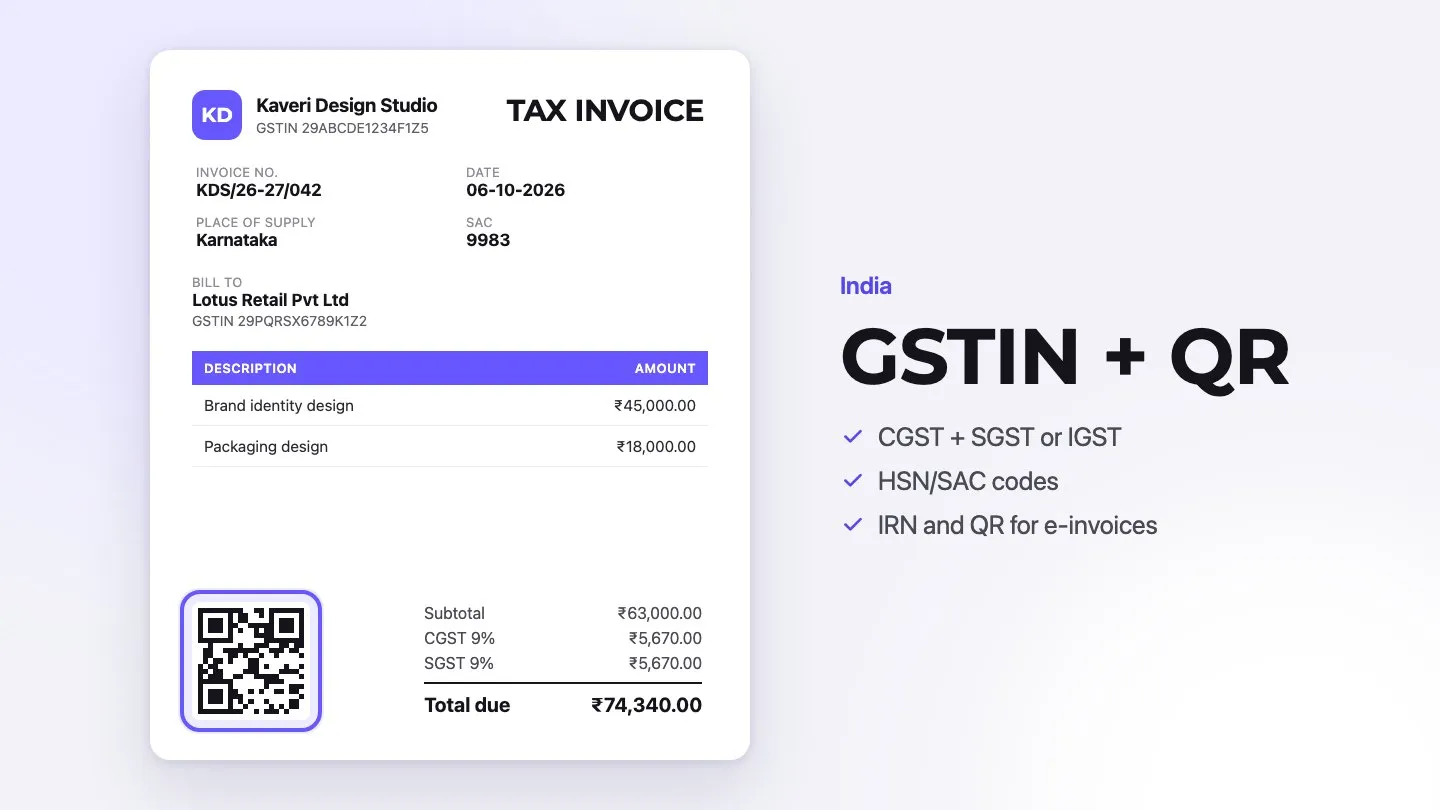
A GST tax invoice must contain a standard set of elements. Think of these as non-negotiable building blocks:
| Essential Element | Description |
|---|---|
| Basic Details | GSTIN, consecutive invoice number, date of issue |
| Party Information | Name, address, and GSTIN of both supplier and recipient |
| Supply Details | HSN/SAC codes, description of goods/services, quantity, taxable value |
| Tax Information | Rate and amount of applicable taxes (CGST/SGST/IGST, and cess where it still applies) |
| Additional Fields | Place of supply, terms, signature or digital signature |
Legal Compliance Guidelines
GST invoice rules vary by transaction type and turnover, especially now that e-invoicing and electronic reporting are rolled out to more taxpayers:
- B2B transactions: Every invoice must carry complete GST details, including GSTIN, place of supply, and HSN/SAC codes.
- B2C transactions: When the buyer is unregistered and the taxable value is below ₹50,000, the invoice doesn’t need the buyer’s name and address, though you should still capture key details for your own records.
- E-invoicing under GST: Businesses whose aggregate turnover has exceeded ₹5 crore in any financial year since 2017-18 must generate e-invoices for B2B supplies, exports and similar documents in the standard schema and register them on an IRP. This threshold has applied since 1 August 2023 and was still current in September 2026.
- GST rates: From 22 September 2025, the GST Council replaced the 5%, 12%, 18% and 28% slabs with two main rates, 5% and 18%, plus a special 40% rate for certain luxury and sin goods, and removed compensation cess on most goods (PIB). Check the current rate for each HSN/SAC code before you update your templates.
For goods, invoices generally need to be issued in triplicate (original for recipient, duplicate for transporter, triplicate for supplier). For services, invoices are issued in duplicate (original for recipient, duplicate for supplier). Maintaining this sequence is important for audit trails.
Time Limits for Invoice Generation
Timing is a core part of GST compliance. Missed deadlines can cause disputes, blocked ITC, and penalties.
For Goods:
- Before or at the time of removal of goods, if movement is involved.
- At the time of delivery or making the goods available, if no movement is involved.
For Services:
- Within 30 days from the date of supply of service.
- Within 45 days for banks and financial institutions.
30-day reporting rule: Since 1 April 2025, businesses with an Annual Aggregate Turnover (AATO) of ₹10 crore or more cannot report an e-invoice (or credit or debit note) on the IRP more than 30 days after the invoice date (GSTN advisory). The IRP rejects late documents, and without an IRN the invoice is not a valid e-invoice, which can cost your customer the input tax credit. Some industries or buyers may also set stricter internal deadlines, so always confirm the specific requirements that apply to your business.
By combining correct content and correct timing, you protect your business from penalties and keep your customer’s ITC claims safe.
Setting Up Your Invoice Template
Now that you know the rules, the next step is to create a robust template that meets GST requirements and is easy to reuse. The right template saves time, reduces errors, and keeps your branding consistent.
Basic Invoice Structure
Design your invoice template so that anyone seeing it for the first time can quickly find key details. A logical layout typically looks like this:
| Section | Purpose |
|---|---|
| Header | Company logo, name, address, contact details, GSTIN |
| Party Information | Supplier and recipient details, including GSTIN and addresses |
| Invoice Details | Invoice number, date, due date, reference information (PO, delivery challan, etc.) |
| Item Details | Description, HSN/SAC, quantity, unit price, taxable value |
| Tax Breakdown | GST rates and amounts (CGST, SGST, IGST, cess) and totals |
| Footer | Terms & conditions, payment details, signature or digital certificate |
Required Fields and Format
Your template must clearly display all mandatory GST fields for both B2B and B2C invoices and work well whether you print it or send it as a PDF.
Key elements to include:
- Document Identifiers: Invoice number, date, due date, and invoice type (tax invoice, bill of supply, export invoice, etc.).
- Party Details: Complete supplier and recipient details, including GSTIN, addresses, and contact information.
- Supply Information: HSN/SAC codes, item descriptions, quantity, unit price, discounts, and taxable value.
- Tax Components: Clear, separate lines for CGST, SGST, IGST, and cess, with rates and amounts.
- Payment Details: Bank name, account number, IFSC, UPI ID (if relevant), and payment terms.
Template Customization Tips
Staying compliant doesn’t mean your invoices have to look generic. You can create a distinctive design that still ticks every regulatory box.
Professional Branding
- Add a high-resolution company logo.
- Use your brand colors for headings and accent lines.
- Include your tagline or registration details such as CIN or MSME number.
Smart Formatting
- Choose clean, readable fonts (e.g., Arial, Calibri, or other sans-serif fonts).
- Maintain consistent spacing, margins, and alignment for a polished look.
- Use subtle borders or shading to separate sections like item details and tax summary.
Always test the template with sample data before going live. This helps you catch alignment issues, missing fields, and rounding problems early. Many businesses also create separate templates for B2B, B2C, and export invoices to streamline their process.
Step-by-Step Invoice Generation Process
With your template ready, it’s time to walk through the practical steps of generating a GST-compliant invoice for India. Follow this flow every time and you will dramatically cut down on errors.
Gathering Required Information
Start by collecting all the information you’ll need. Missing data is one of the most common causes of invoice delays.
| Information Type | Details Required |
|---|---|
| Business Details | Your GSTIN, legal name, trade name, and registered address |
| Customer Information | Recipient’s GSTIN (for B2B), billing and shipping addresses, contact person |
| Transaction Data | Purchase order number, delivery challan, contract or agreement references |
| Product/Service Details | HSN/SAC codes, item descriptions, quantity, unit price, discount rules |
| Banking Information | Account details and preferred payment modes for easy collection |
Filling Invoice Details
Once all details are available, start filling your invoice from top to bottom to ensure nothing is missed.
Header Information
- Generate a unique invoice number following your internal series pattern.
- Enter the invoice date and, where applicable, the due date.
- Insert your company details, logo, and GSTIN exactly as registered.
Customer Information
- Add the recipient’s legal name and GSTIN for B2B invoices.
- Capture billing and shipping addresses with state and PIN code.
- Specify the place of supply to determine whether CGST+SGST or IGST applies.
Product/Service Details
- List every item or service line with its HSN/SAC code.
- Enter quantities, unit prices, and any discounts applied before tax.
- Ensure taxable value for each line is correctly computed.
Calculating GST Components
Accurate tax calculation is critical for compliance and for your customer’s input tax credit.
- Calculate the net taxable value for each line item (quantity × unit price − discount).
- Apply the correct GST rate for that HSN/SAC code.
- For intra-state supplies, split the GST equally into CGST and SGST.
- For inter-state supplies, charge IGST at the full rate.
Pro Tip: Many modern invoicing tools and ERP systems integrate directly with the e-invoice portal and auto-calculate GST based on HSN codes. This reduces manual mistakes and ensures your totals match the IRP’s validation.
If you have multiple tax rates on the same invoice, group lines by rate in your tax summary. This makes reconciliation and Input Tax Credit (ITC) tracking much easier.
Before finalizing the invoice, always verify that the grand total (including taxes, freight, discounts, and other charges) matches the amount written in words.
Validating Your Invoice
After an invoice is generated, you still need to confirm that it passes both GST rules and e-invoice validations. Early checks save time and avoid disputes later.
Common Validation Errors
Here are frequent issues businesses encounter, plus how to fix them:
| Error Type | Common Issue | Resolution |
|---|---|---|
| Tax Calculation | Differences between line-level taxes and invoice total | Recalculate and verify with the e-invoice portal or a trusted GST calculator |
| GSTIN Format | Incorrect or invalid GSTIN for supplier or recipient | Cross-check GSTIN on the official GST portal before invoicing |
| HSN Codes | Wrong or outdated HSN/SAC codes | Validate against the latest HSN master and ensure correct digits based on turnover |
| Invoice Value | Grand total not matching the sum of taxable values, taxes, and charges | Review each component (discounts, freight, round-off) and adjust carefully |
Compliance Checklist
Run through this quick checklist before sharing the invoice with your customer or uploading it to the IRP:
Document Basics
- Invoice number follows a consistent, consecutive pattern.
- Invoice date falls within the permitted timeframe for issuance.
- If applicable, a valid IRN (Invoice Reference Number) is generated.
- The QR code on e-invoices is clear and scannable.
Tax Components
- Correct GST rates applied to each HSN/SAC.
- CGST/SGST split correctly for intra-state supplies.
- IGST applied correctly for inter-state supplies and exports.
- Place of supply correctly mentioned for every invoice.
Quality Control Measures
High-quality invoice generation combines automation with smart manual checks.
Automated Validation Tools
- Use the official e-invoice portal or integrated software to validate JSON payloads.
- Adopt GST-approved mobile apps for quick QR code and IRN verification.
- Keep your systems updated to reflect the latest rules and rate changes, such as the September 2025 GST rate changes.
Manual Review Process
- Cross-verify customer and supplier details before sending the invoice.
- Double-check tax calculations and totals, especially when rates differ by item.
- Review special fields such as export details, reverse charge indicators, or SEZ supplies.
Note: B2B taxpayers crossing the e-invoicing turnover threshold (₹5 crore as of September 2026) must generate invoices through the e-invoice system. Businesses with AATO of ₹10 crore and above must additionally ensure that every e-invoice is reported to the IRP within 30 days of the invoice date to remain valid.
Submitting to Invoice Registration Portal
For taxpayers covered by e-invoicing, an invoice becomes fully valid only after it is registered on the IRP and assigned an IRN and QR code. This step connects your invoice with the GST and e-way bill systems.
IRP Registration Process
Before you can upload invoices, you need to activate your e-invoice account:
- Visit https://einvoice.gst.gov.in to check your enablement status.
- If eligible, complete self-enablement on the portal using your GSTIN and login credentials.
- Verify your registered mobile number and email via OTP. Once verified, you can use any of the authorized IRP portals below.
Registration is free on the following IRP portals:
| Portal URL | Purpose |
|---|---|
| einvoice1.gst.gov.in | Primary Portal |
| einvoice2.gst.gov.in | Alternative Portal |
| einvoice3.gst.gov.in | Alternative Portal |
| einvoice4.gst.gov.in | Alternative Portal |
| einvoice5.gst.gov.in | Alternative Portal |
| einvoice6.gst.gov.in | Alternative Portal |
IRN Generation Steps
After registration, generating an Invoice Reference Number (IRN) involves three main stages.
Data Preparation
- Structure invoice data according to the latest INV-01 schema.
- Convert the data into JSON format through your billing system or tools provided by the IRP.
- Ensure all mandatory and relevant optional fields are filled correctly.
Upload Process
- Upload the JSON file via API, offline tool, or directly on the IRP portal.
- The system runs automatic validations on structure, GSTINs, and values.
- Any duplicate or invalid entries are flagged for correction.
Validation & Processing
- The IRP confirms your GSTIN and invoice details against the central registry.
- On successful validation, the portal generates a unique IRN and digitally signed JSON.
- A QR code is embedded and returned along with the e-invoice data.
QR Code Implementation
A valid e-invoice includes a QR code that stores key invoice information. This allows anyone with the right tools to verify the invoice offline.
QR Code Components:
- IRN (Invoice Reference Number)
- Supplier GSTIN
- Recipient GSTIN
- Invoice number and date
- Invoice value
- Number of line items
- HSN code of the main item
The QR code simplifies verification, supports faster audits, and reduces the risk of fake invoices. You can validate the authenticity of any e-invoice using:
- The official GSTN e-Invoice QR Code Verifier app (Android and iOS).
- The “Search IRN” feature on einvoice.gst.gov.in.
- Verification tools provided on authorized IRP portals.
After IRN generation, the IRP automatically shares invoice data with the GST and e-way bill systems. This pre-fills parts of GSTR-1 and e-way bills, reducing manual data entry and errors.
Managing Invoice Records
Strong record management is essential for GST compliance, audits, and business continuity. E-invoicing has not removed the need to keep organized records—it has only changed the format.
Storage Requirements
Under Section 36 of the CGST Act, you must keep GST books and records, including invoices, for 72 months (6 years) from the due date of the annual return for the year they relate to. If the records concern an appeal, revision or other proceedings, keep them until one year after those proceedings are finally settled, if that is later. Other laws, such as the Income Tax Act, the Companies Act or foreign trade rules for exports, have their own periods, so ask your accountant which applies to each document type:
| Document Type | Minimum Storage Period | Format Requirements |
|---|---|---|
| GST Invoices, Credit and Debit Notes | 72 months from the due date of the annual return | Physical or electronic |
| E-invoice Data (IRN, signed QR code) | With the invoice it belongs to | Electronic, including the signed JSON |
| E-way Bills | With the related invoices | Electronic |
| Input Tax Credit Records | 72 months, or longer if under audit or proceedings | Electronic with reliable backup |
Key Storage Principles:
- Maintain at least two independent backups of all digital records.
- Preserve both original formats (JSON/XML, native files) and PDF/A versions for long-term readability.
- Use version control and audit logs for any edited documents.
Archiving Best Practices
A good archiving strategy ensures records are secure yet easy to retrieve during audits or disputes.
Digital Archival System
- Store sensitive records on secure servers or cloud storage with encryption at rest.
- Schedule automated, incremental backups.
- Log all access and changes with user and timestamp details.
- Test backup restorations regularly to ensure data integrity.
Security Protocols
- Use multi-factor authentication for systems that store invoice data.
- Conduct periodic security reviews and vulnerability checks.
- Encrypt data transfers, especially when sending invoices or reports over the internet.
- Implement a clear disaster recovery and business continuity plan.
Storage Media Guidelines
- Choose media known for durability and reliability (enterprise-grade disks, cloud storage, etc.).
- Ensure long-term readability by using standard, widely supported formats.
- Monitor storage health and replace aging hardware proactively.
Record Retrieval Systems
An efficient retrieval system is just as important as safe storage. You should be able to find any invoice within minutes.
1. Organization Structure
- Organize records by financial year, GSTIN, and document type.
- Use intuitive file naming conventions that reflect invoice number and customer.
- Implement index fields for quick filtering (e.g., customer name, GSTIN, HSN, IRN).
2. Access Control
- Grant access on a need-to-know basis with role-based permissions.
- Track every view, download, and change in an audit log.
- Review permissions periodically and remove unused accounts promptly.
3. Search and Retrieval
- Use search tools that allow filtering by invoice date, customer, amount, IRN, and HSN.
- Enable bulk export for audits, lender requests, or management reviews.
- Generate automated compliance and aging reports where possible.
For extra resilience, many businesses use a combination of on-premises storage (for fast access) and encrypted cloud backups (for redundancy). E-invoices should always be stored alongside their IRN, QR code, and API logs to maintain a complete audit trail.
Conclusion
In India’s evolving GST landscape, invoices are more than payment requests—they are core compliance documents that protect input tax credit, support audits, and shape your professional image.
By understanding GST invoice requirements, building a smart template, following a clear step-by-step process, validating each invoice, and managing records carefully, you can turn invoicing from a headache into a strength.
Complex tax rules demand smart tools. If you’re below the e-invoicing threshold, Invoxa (3-day free trial) lets you add your GSTIN, set up your GST rates, and send branded invoices in INR. Invoxa does not connect to the IRP, so if e-invoicing applies to you, use software that generates IRNs.
Follow the steps in this guide consistently and you’ll avoid penalties, speed up payments, and build strong relationships with both customers and tax authorities.
FAQs
Q1. What are the essential elements of a GST-compliant invoice in India?
A GST-compliant invoice must include the supplier’s and recipient’s GSTIN (for B2B), invoice number, date of issue, place of supply, HSN/SAC codes, description of goods or services, quantity, taxable value, applicable tax rates, tax amounts, and the total invoice value. For B2B transactions, complete GST details are mandatory, while simplified invoices may be used for B2C invoices below ₹50,000.
Q2. How do I generate an e-invoice in India?
To generate an e-invoice, prepare your invoice using approved software or an invoicing tool and structure the data according to the latest INV-01 schema. Convert it into JSON format and upload it to an authorized Invoice Registration Portal (IRP) via API, offline tool, or web upload. The IRP validates the data, generates a unique Invoice Reference Number (IRN), and returns a digitally signed e-invoice with a QR code, which you then share with your buyer.
Q3. What are the time limits for issuing and reporting invoices under GST?
For goods, invoices must be issued before or at the time of removal if movement is involved, or at the time of delivery if there is no movement. For services, invoices should be issued within 30 days of service provision (45 days for banks and financial institutions). From April 1, 2025, businesses with AATO of ₹10 crore or more must also report their e-invoices to the IRP within 30 days of the invoice date, or the IRP may reject them.
Q4. How long should I keep invoice records, and in what format?
Under Section 36 of the CGST Act, GST records, including invoices, must be kept for 72 months (6 years) from the due date of the annual return, and longer if they relate to an appeal or other proceedings. Other laws may require their own periods, so check with your accountant. You can store these records physically or digitally, but maintaining at least two digital backups and keeping PDF/A and original formats is strongly recommended.
Q5. What are some best practices for invoice validation?
Combine automated tools with manual checks. Use official e-invoice portal validators and GST-approved apps to verify JSON data, IRN, and QR codes. Internally, establish a review process to confirm party details, tax rates, and totals before sending invoices or reporting them to the IRP. If your business crosses the e-invoicing turnover threshold, ensure all covered documents—tax invoices, credit notes, debit notes, and export invoices—are generated and reported through the e-invoice system on time. Regularly updating your software with new GST notifications keeps your invoices compliant as the rules evolve.